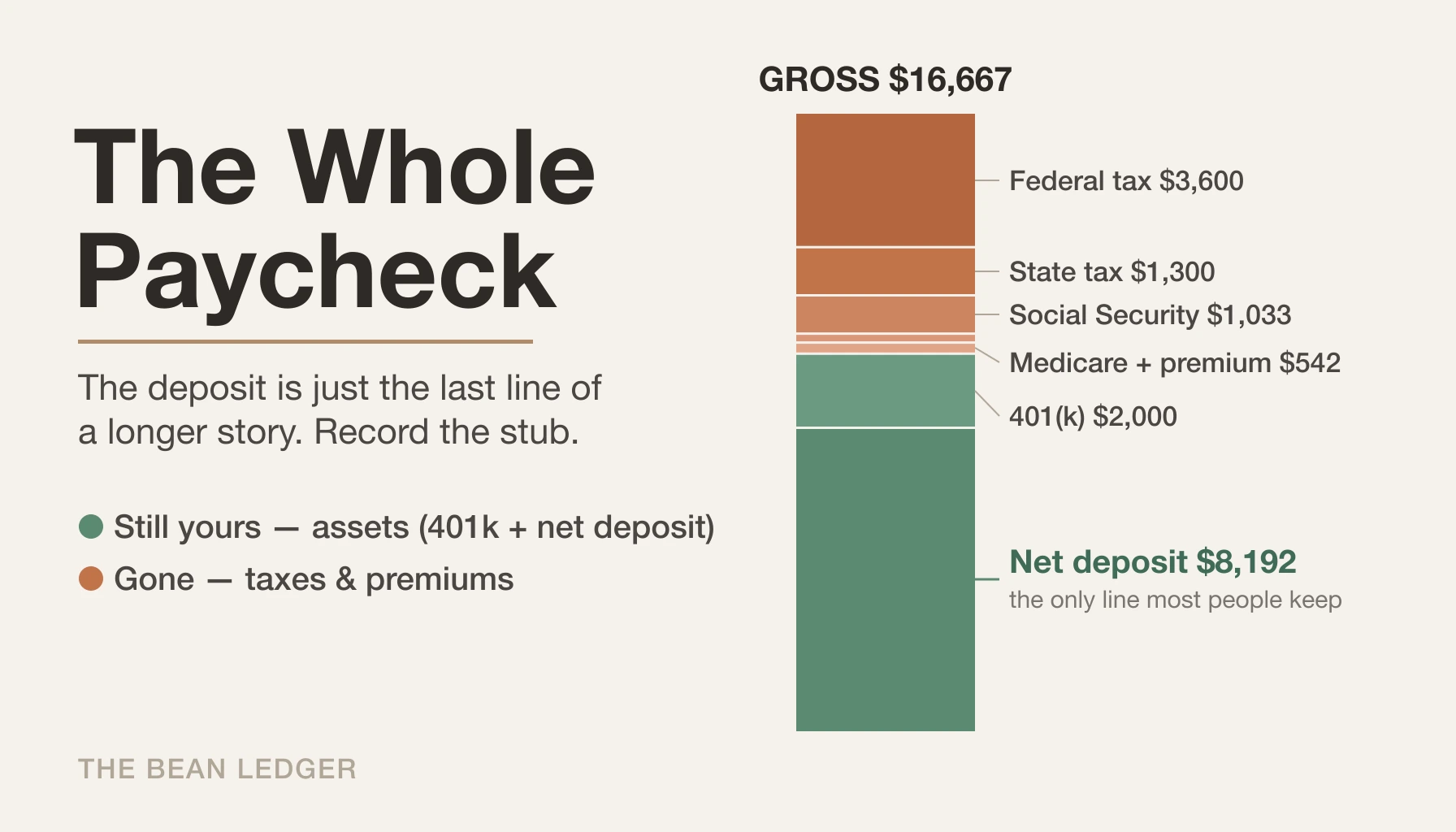
It’s payday. Your checking account goes up by 8,192 USD. You open your ledger, add one line — salary came in, cash went up — and move on with your day.
That entry feels complete. It balances, the number matches the deposit, nothing is wrong. And yet you’ve just thrown away most of the information you were actually paid.
Because 8,192 USD isn’t your income. It’s what’s left of your income after the government, your retirement account, and your health plan have each taken a slice. Your real paycheck was 16,667 USD. The gap between those two numbers — everything that happened on the way from gross to net — is where nearly all the interesting financial information lives. If the only thing you record is the number that lands in your account, you’ve deleted it.
This is the single most common mistake I see people make when they start keeping their own books. It’s worth understanding exactly what you lose, and how little effort it takes to keep it.
The Beancount example in this post can be found in: https://github.com/flyaway1217/beancount_example/blob/main/single_examples/paycheck.bean
The paystub is a report you’re already being handed
Every two weeks, or twice a month, your employer produces a fully itemized financial document and hands it to you for free. It tells you precisely how much you earned, how much tax was withheld across several separate categories, how much went into retirement, and how much went to benefits. Payroll departments spend real money getting these numbers right.
Then most people look at the bottom line, confirm it matches their bank, and archive the PDF forever.
The reason this matters isn’t bookkeeping tidiness. It’s that a whole class of questions you’ll eventually want to answer can only be answered if this data is in your ledger:
- How much tax has actually left our paychecks so far this year?
- How much have we contributed to retirement, and are we on track to max it out?
- If one of us loses a job, how much of our “income” was really discretionary versus locked away before we ever saw it?
None of these can be reconstructed from a net deposit. They can all be computed automatically — for free, forever — if you record the paystub the way it’s actually structured. The correct question when you record a paycheck isn’t “how much came in.” It’s “where did every dollar go before it reached me.”
But doesn’t the stub already total this for you?
You might object that the stub already totals this for you — the YTD columns run down the side of every paycheck. They do, but only for one employer, for one calendar year, walled off from the rest of your money. The moment a question crosses those lines — two earners, an RSU vest on a separate supplemental stub, this year versus last, tax as a share of all your income — the YTD column has nothing to say. Recording the stub is how you get data that composes; the YTD total is a number someone else computed for a question narrower than the ones you’ll actually ask.
Walking through a real paystub
Let me make this concrete with an example I’ll use throughout — Wei, a software engineer, gross salary 200,000 USD a year, so a little over 16,667 USD a month. Here’s what a single paycheck actually contains.
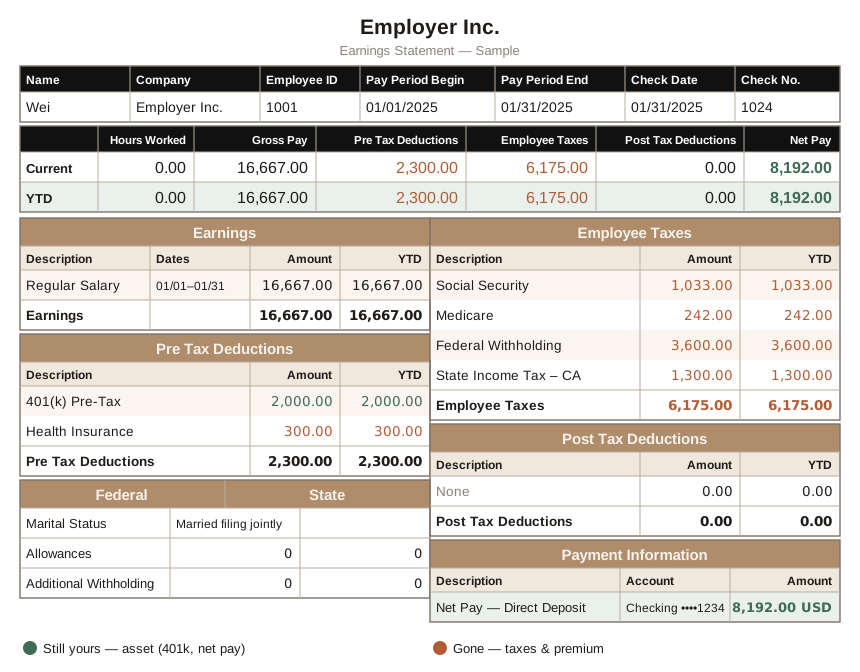
Wei’s paycheck as a single stub — 16,667 USD gross broken down into taxes, pre-tax deductions, and the 8,192 USD net deposit. Company, employee, and account details are anonymized; green marks what stays yours, terracotta what’s gone.
The income line. Gross pay: 16,667 USD. This — not the deposit — is the number that belongs in an income account. Everything else on the stub is a subtraction from it.
The taxes. This is usually four separate lines, and they should stay separate:
- Federal income tax withheld: 3,600 USD
- State income tax withheld (Wei is in California): 1,300 USD
- Social Security: 1,033 USD
- Medicare: 242 USD
It’s tempting to collapse these into one “taxes” bucket. Don’t. Social Security and Medicare behave differently from income tax withholding — they’re not refundable and don’t reconcile against your return the way withholding does. And keeping federal and state apart is what lets you answer state-level questions later, which matters enormously the moment your household spans more than one state.
The retirement contribution. Wei puts 2,000 USD into a traditional 401(k), pre-tax, straight off the stub. Here is the part that trips people up: this is not an expense. The money didn’t leave your net worth. It moved from one account you own to another account you own. Recording it as a cost would understate your savings and make you look poorer than you are. It’s an asset that changed location, not money that disappeared.
One thing you won’t see on this stub is your employer’s matching contribution. Because a match isn’t withheld from your pay, it doesn’t appear on the paycheck at all — it shows up later as a deposit in the retirement account itself, and it’s best recorded there, alongside how that cash gets invested. We’ll leave it off the paycheck and handle it where it belongs.
The benefits. Wei’s share of the health insurance premium: 300 USD, also pre-tax. This one is a cost — it buys coverage, and the money is gone. Into an expense account it goes.
Add up every subtraction — 3,600 USD + 1,300 USD + 1,033 USD + 242 USD + 2,000 USD + 300 USD = 8,475 USD — and take it off the 16,667 USD gross, and you get 8,192 USD. The deposit. The net figure isn’t wrong; it’s just the last line of a much longer story, and it’s the only line most people keep.
Recording it as one transaction, not ten
The mental model that makes this easy: a paycheck is a single transaction with many movements inside it. You don’t record ten separate entries. You record one entry that splits the gross into all its destinations at once. Double-entry does the enforcement for you — if your splits don’t sum back to the gross, the entry won’t balance and your tools will refuse it. The paystub, in other words, checks your work.
In Beancount, the whole paycheck is one posting group:
2025-01-31 * "Employer Inc." "January salary — Wei"
    ; Gross income
    Income:Work:Salary                            -16667.00 USD
    ; Taxes withheld
    Expenses:Taxes:Federal:IncomeTax:Withhold       3600.00 USD
    Expenses:Taxes:State:CA:IncomeTax:Withhold      1300.00 USD
    Expenses:Taxes:Federal:SocialSecurityTax        1033.00 USD
    Expenses:Taxes:Federal:MedicareTax               242.00 USD
    ; Pre-tax retirement contribution — still yours
    Assets:Retirement:401K:Cash:PreTax:Vanguard     2000.00 USD
    ; Pre-tax benefit — spent
    Expenses:Health:Insurance                         300.00 USD
    ; Net deposit
    Assets:Cash:Checking:Chase                       8192.00 USD
Read it top to bottom and it mirrors the stub exactly: gross income flows in, and seven lines describe where it went. The retirement contribution lands in Assets: because it’s still yours — that cash later gets invested inside the 401(k), a step worth its own entry. The premium and the taxes land in Expenses: because they’re not coming back. The last line is the only piece you’d have recorded under the naive approach — and now it’s just one destination among several.
One line in that block is worth a closer look — Expenses:Taxes:Federal:IncomeTax:Withhold. The name is deliberate, and it encodes something easy to miss: what a paystub withholds for income tax is a prepayment, not your final tax bill. Your true liability isn’t settled until you file. That’s all the Withhold in the name is claiming — it records the amount withheld, not the final number. How the two get reconciled at filing is the subject of the taxes post on this site.
Isn’t entering eight lines every two weeks tedious?
A word on the obvious objection: isn’t entering eight lines every two weeks tedious? In practice it takes about a minute, because you never start from scratch. Order the postings to match the physical layout of your stub, top to bottom, and each pay period you copy last month’s entry and read down the page, adjusting numbers as you go. And you do need to read down the page — the numbers drift. A bonus or an RSU vest is withheld at a different supplemental rate; a mid-year raise moves everything below it. And at a 200,000 USD salary, one paycheck late in the year will quietly stop withholding Social Security altogether: your cumulative wages have crossed the annual wage base (176,100 USD in 2025, and it ratchets up most years), so the 1,033 USD line simply vanishes and your take-home jumps. Reading the stub line by line is exactly what catches those changes. (You can automate much of this later with an importer, but even then you’re reviewing the same lines.)
The payoff shows up the first time you want a number back out. Total federal income tax withheld this year is a single query:
SELECT sum(position)
WHERE account ~ "Expenses:Taxes:Federal:IncomeTax" AND year = 2025
No spreadsheet, no digging through PDFs in April. You recorded the structure once, and every report that depends on it comes for free.
What this unlocks
Recording the full stub isn’t extra work for its own sake. It’s the precondition for a set of things you’ll otherwise do by hand, badly, once a year:
Your withholding, continuously. With every tax line in its own account, you can see exactly how much has left your paychecks for taxes at any point in the year — a running total, not an April guess. Keep the naming honest, though: this is your withholding, a prepayment, not your final tax rate. The true number is only settled when you file, and the taxes post covers how that reconciliation gets recorded. What the paycheck gives you is the faithful record that makes that reconciliation possible.
Your savings, counted honestly. That 2,000 USD into the 401(k) is real saving, but it’s invisible if you only track your deposit — the money never touched your checking account. Recorded properly, it flows into your savings figures automatically instead of vanishing before you ever see it.
A ledger that ties out to your W-2. This is the part an engineer will appreciate. At year end, the totals in your Expenses:Taxes accounts should match your W-2 box for box — federal withholding, Social Security, Medicare, state. If they don’t, you have a data-entry bug to go find. You’ve effectively turned your W-2 into an assertion against a full year of paychecks.
A rule you can verify, not just trust
That Social Security line is the cleanest example. Sum the account across the year and the total should land at exactly 6.2% of the wage base — 10,918 USD in 2025 — and go no higher, because the per-check deduction drops to zero once your cumulative wages cross the cap in the fall. That ceiling is a rule you can now verify instead of trust: run the query, check the number against the rule. And it earns its keep the moment someone changes jobs mid-year: each employer withholds up to the cap independently, so the combined total sails past 10,918 USD, and the excess is money you’re owed back on your return. A ledger surfaces that overpayment automatically. A stack of PDFs does not.
None of this required extra discipline at recording time. It required recording at the right granularity — the stub’s granularity — a single time.
Back to that deposit
So return to the number we started with: 8,192 USD hitting the account on payday. Under the naive approach, it’s a dead end — a figure you can’t decompose, attached to a paycheck whose actual shape you’ve discarded. Recorded as the full stub, that same deposit becomes the tail of a complete record: you can reconstruct the gross, the total withheld, the split across federal and state, the retirement contribution, all of it, from one entry you’ll write in under a minute.