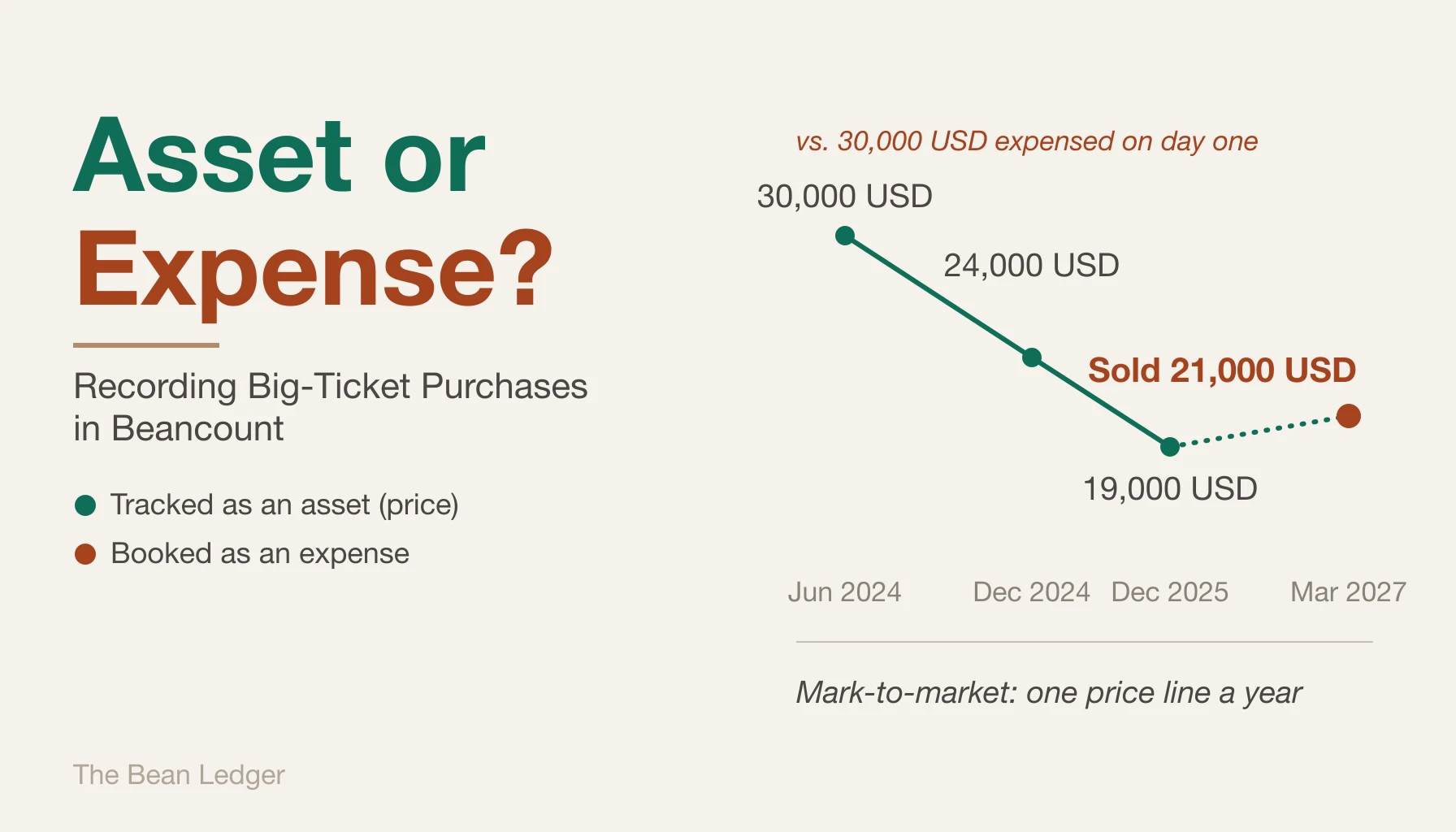
You sign for a new car, and 30,000 USD leaves your checking account in a single transfer to the dealer. That night you open Beancount to record it, and the entry stalls on what feels less like data entry than a type error. Expense it, and Expenses absorbs 30,000 USD in one month — the income statement now reports that you torched a year’s discretionary budget, when in fact a car worth nearly that much is sitting in the driveway. Capitalize it as an asset instead, and net worth jumps by the sticker price of something that began depreciating the instant it left the lot; leave that number frozen and, three years on, the balance sheet still asserts the car is worth exactly what you paid, long after it’s really worth closer to 15,000 USD. Neither entry reconciles with reality. That mismatch — a value that won’t sit cleanly in either bucket — is the signal worth debugging: the categories aren’t broken, they’re being applied to the wrong kind of thing.
The Beancount example in this post can be found in: https://github.com/flyaway1217/beancount_example/blob/main/single_examples/big_ticket_purchases.bean
Buying an Asset Is Not the Same as Spending Money
In double-entry accounting, purchasing something valuable is not, by itself, an expense. When you buy a car, you’re exchanging one asset for another — cash for vehicle. Your net worth doesn’t move at the moment of purchase. The real expense is whatever portion of that value evaporates over time as the thing you bought wears out, ages, or falls out of demand.
This reframing resolves the tension that shows up whenever someone tries to record a big purchase:
- “If I expense it, a huge chunk of spending appears out of nowhere — but I’ll get most of that money back when I sell the car.” That intuition is correct: it means the car shouldn’t be a pure expense.
- “If I capitalize it as an asset, my net worth looks inflated.” That intuition is also correct — but the problem isn’t capitalizing the purchase. It’s capitalizing it and then never depreciating or revaluing it.
The rule that falls out of this: either don’t capitalize it, or capitalize it and commit to tracking its declining value. Don’t do the thing in between, where a 30,000 USD car sits on your balance sheet at 30,000 USD forever.
The Capitalization Test
Something earns a place as an asset — rather than being expensed on day one — only if it passes all three of the following checks. Fail any one of them, and it goes straight to an expense account.
- Is the amount material relative to your overall net worth?
- Is there a real resale market — could you actually recover meaningful value by selling it?
- Does it have a long enough useful life to be worth tracking for more than a single accounting period?
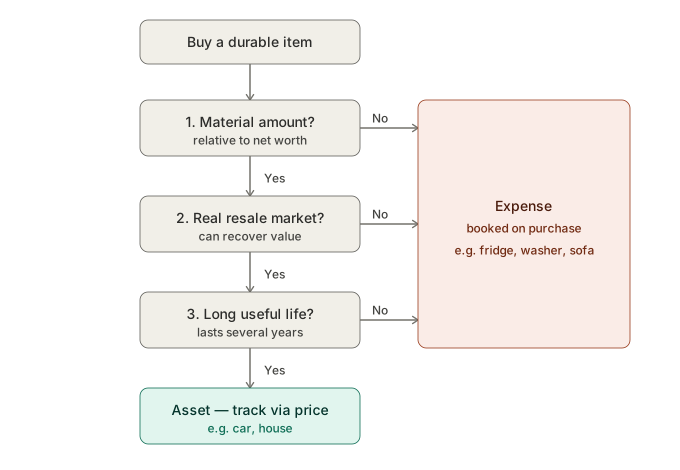
A useful shortcut sits on top of these three: if the dollar amount doesn’t move the needle on your net worth, skip the analysis entirely and expense it. A 3,000 USD refrigerator is noise to a household with a net worth in the high six or seven figures — it’s not worth opening a fixed-asset account and a depreciation schedule just to track something that will be donated or trashed in ten years for close to nothing.
Running the Test on Common Purchases
| Item | Treatment | Why |
|---|---|---|
| House | Asset | Large dollar amount, real market, very long useful life — usually tracked at market value rather than depreciated |
| Car | Asset | Passes all three tests, but depreciates fast, so it needs an explicit mark-to-market or depreciation process |
| Refrigerator, washer/dryer | Expense | Resale value on the used market is close to zero — fails the resale test |
| Couch | Expense | Same problem — no real market to recover value from |
A new couch, or the dishwasher that finally gives out mid-cycle, never earns this much deliberation — it goes straight to Expenses:Home and is forgotten before the statement closes. That’s the correct call, and it’s the whole point of the test: most purchases resolve in two seconds, and only the rare large, long-lived ones deserve the deliberation a car gets.
Houses and cars are the two cases worth building real infrastructure around, because they’re both large and long-lived. The difference between them is speed: a house might sit on your books at roughly the same value for years, while a car needs its value checked and updated regularly, since it can lose 20% of its worth in the first twelve months alone.
Two Ways to Record a Depreciating Asset
There are two legitimate ways to keep a car’s book value in line with reality. The first treats depreciation as an expense you actively record. The second — the one I recommend — treats the car like a security whose price you update periodically, with no depreciation entries at all.
Option A: Manual Depreciation Entries
The purchase is booked as an asset swap with no expense impact. Each subsequent year, you record the drop in value as a depreciation expense, reducing the asset’s book value. When you eventually sell it, you write off whatever book value remains and record the difference between sale price and book value as a gain or loss.
; ---- Purchase (asset swap, no expense) ----
2024-06-01 * "Dealer" "Buy car"
  Assets:Fixed:Vehicle       30000 USD
  Assets:Bank:Checking      -30000 USD

; ---- Annual depreciation entry ----
; Straight-line over 6 years, zero salvage value -> 5,000 USD/year
2024-12-31 * "Annual depreciation" "Vehicle"
  Expenses:Depreciation:Vehicle   5000 USD
  Assets:Fixed:Vehicle           -5000 USD

; Or a mark-to-market entry instead
; (look up the used value, book value adjusted down to 24000 -> 6,000 USD drop)
2024-12-31 * "Mark to market" "Vehicle -> used value 24000"
  Expenses:Depreciation:Vehicle   6000 USD
  Assets:Fixed:Vehicle           -6000 USD

; ---- Sale (book value has fallen to 20000, sells for 21000 -> 1,000 USD gain) ----
2027-03-01 * "Sell car"
  Assets:Bank:Checking      21000 USD
  Assets:Fixed:Vehicle     -20000 USD
  Income:Gains:Vehicle      -1000 USD
The advantage here is visibility: depreciation shows up in Expenses:Depreciation and appears directly on your income statement, answering “what did owning this car actually cost me?” The cost is that you have to write a complete entry every single year, calculate the depreciation or revaluation amount yourself, and if you forget a year, your book value silently drifts above reality.
Option B: Mark-to-Market with price Directives (Recommended)
The alternative is to treat the car as a commodity you hold exactly one unit of — the same mechanism Beancount uses for tracking stock prices — and update its value with a price directive instead of a depreciation entry. No annual bookkeeping beyond a single line.
; ---- One-time setup: declare the commodity, then buy it ----
2024-06-01 commodity CAR.CRV
  name: "2024 Honda CR-V (VIN ...1234)"

2024-06-01 open Assets:Fixed:Vehicle   CAR.CRV

2024-06-01 * "Dealer" "Buy car"
  Assets:Fixed:Vehicle       1 CAR.CRV {30000 USD}
  Assets:Bank:Checking     -30000 USD

; ---- One line per year: look up the used value, update the price ----
2024-12-31 price CAR.CRV 24000 USD
2025-12-31 price CAR.CRV 19000 USD

; ---- Sale ----
2027-03-01 * "Sell car"
  Assets:Fixed:Vehicle      -1 CAR.CRV {30000 USD} @ 21000 USD
  Assets:Bank:Checking     21000 USD
  Income:Gains:Vehicle
{30000 USD} establishes the cost basis at purchase. On the sale line, leave Income:Gains:Vehicle with no amount — Beancount computes the realized gain or loss automatically as the difference between sale proceeds and cost basis. From then on, upkeep is a single price line at the end of each year. Nothing else changes.
One thing worth setting your expectations on: that realized gain or loss is computed against the original cost basis, not against last year’s price. Every price entry you’ve been logging only ever creates an unrealized loss — it never touches Income:Gains:Vehicle. So when you finally sell, the entire multi-year decline lands in one lump sum: a car bought for 30,000 USD and sold for 21,000 USD posts a realized loss of 9,000 USD at that moment, even though you’d already watched most of that decline show up in your net worth, one price entry at a time, for the past two years. Nothing is wrong or double-counted — the loss was always there in the market-value view — it just becomes “official” on the income statement only at the point of sale, all at once.
The One Gotcha: Reports Default to Cost, Not Market Value
The first time you try this, it looks broken. The default view still shows the vehicle account at its original cost (30000), as if the updated price entries did nothing. That’s because Beancount and Fava display holdings at cost basis by default. To actually see the depreciation reflected, switch Fava’s toolbar toggle to “At Market Value.” Only then does the car’s current value — and your net worth — update to match the price entries you’ve been logging. The cumulative decline shows up in Fava’s unrealized-gains view under holdings.
Cost-basis view showing no depreciation isn’t a bug and isn’t a sign you recorded something wrong. You’re just looking at the wrong report — switch to market value.
Two practical notes worth keeping in mind:
- Prices don’t fetch themselves.
bean-pricecan pull stock quotes and exchange rates automatically, but there’s no equivalent feed for a house or a car — their market value can’t be pulled from an API, only estimated by hand from the usual valuation sites. For a home, that means an online estimate from Zillow or Redfin; for a car, a used-value site like KBB. You look up one number once a year and paste in a singlepriceline. That manual step is the design, not a limitation. - Each vehicle is its own commodity. Two cars means two separate commodity declarations (
CAR.CRV,CAR.CAMRY), each with its own cost basis and price history. The same pattern applies to houses. Commodity names must start with a capital letter and can only contain capital letters, digits, and. _ -.
If you want depreciation to show up as an explicit line item rather than staying implicit in the market-value view, Beancount’s beancount.plugins.unrealized plugin can generate those entries automatically into an Income:...:Unrealized account. For most households, Fava’s market-value view is enough on its own, and the plugin is optional overhead.
Choosing Between the Two
| Option A: Manual Depreciation | Option B: price Mark-to-Market (recommended) |
|
|---|---|---|
| Ongoing effort | A full entry every year, with the depreciation or revaluation amount computed by hand | One price line per year — the least effort of the two |
| Where depreciation shows up | Expenses:Depreciation, visible directly on the income statement |
An unrealized loss against net worth, not on the income statement |
| Answers “what did owning this cost me?” | Yes — depreciation appears as a real expense you can analyze | No — the decline in value never becomes an expense line |
| Net worth accuracy | Accurate, as long as you keep up with annual entries | Accurate, as long as you keep up with annual price updates |
| Selling the asset | You manually write off book value and compute the gain/loss yourself | Beancount computes the realized gain/loss automatically from the cost lot |
| Main failure mode | Skip a year’s depreciation and book value silently drifts too high | Forgetting that reports default to cost — switch to “At Market Value” |
| Best fit | You actually want to analyze the cost of ownership as part of your budget | You just want an accurate net worth with minimal upkeep — especially for houses |
For most households, the goal is narrower than it first appears: check the used-value once a year, touch the ledger as little as possible, and keep net worth accurate. The price approach hits exactly that target — one line a year, automatic settlement on sale, and the same mechanism scales to a house without any extra machinery.
The one thing manual depreciation gives you that mark-to-market doesn’t is turning the decline in value into an actual expense line you can analyze alongside groceries and utilities. If you’re not going to use that number for anything, the extra bookkeeping it requires doesn’t pay for itself. The two approaches aren’t mutually exclusive, either — nothing stops you from running manual depreciation on one vehicle you’re actively cost-analyzing while every other asset in the household uses the simpler price method.
The One-Line Version
Once a car is set up this way, the yearly price check takes about as long as it took to read this sentence — which was the entire point of the method.
Buying doesn’t reduce your net worth. Once a year, add a price line with the current used value. Remember to view your reports “At Market Value,” not at cost. When you sell, leave the gains account empty and let Beancount settle it for you.